Instagram is one of the most competitive social media platforms today. Whether you’re an influencer, business owner, student, content creator, or brand, making your profile stand out has become more important than ever. One simple way to grab attention is by using stylish text in your bio, captions, comments, and username.
That’s where IGsty Text Formatter comes in.
Instead of using plain text, this tool converts your words into attractive Unicode styles that can be copied and pasted directly into Instagram and many other social media platforms.
In this guide, you’ll learn how IGsty Text Formatter works, why it has become popular, where you can use it, and how to get the best results without running into common formatting problems.
Table of Contents
- What Is IGsty Text Formatter?
- Why Do People Use IGsty Text Formatter?
- How Does IGsty Text Formatter Work?
- How to Use IGsty Text Formatter
- Popular Font Styles Available
- Where Can You Use Stylish Text?
- Best Uses for IGsty Text Formatter
- Why Instagram Doesn’t Have Native Bold Text
- Is IGsty Text Formatter Free?
- Is It Safe to Use?
- Benefits of Using IGsty Text Formatter
- Can Businesses Use Unicode Fonts?
- Common Problems and How to Fix Them
- Device Compatibility
- Accessibility Tips
- Does Stylish Text Affect SEO?
- IGsty Text Formatter vs Native Instagram Text
- Unicode Text vs Font Apps
- Best Practices
- Mistakes to Avoid
- Alternatives to IGsty Text Formatter
- Who Should Use IGsty Text Formatter?
- Frequently Asked Questions
- 1. What is IGsty Text Formatter?
- 2. Is IGsty Text Formatter free?
- 3. Does Instagram support fancy fonts?
- 4. How do I make bold text on Instagram?
- 5. Can I use stylish text on LinkedIn?
- 6. Why do some fonts not display correctly?
- 7. Is Unicode safe?
- 8. Can businesses use IGsty Text Formatter?
- 9. Does using stylish text increase engagement?
- 10. Which platforms support Unicode text?
- Conclusion
What Is IGsty Text Formatter?
IGsty Text Formatter is a free online text formatting tool that converts normal text into stylish Unicode text. Instead of installing an app or creating an account, users simply type or paste their text, choose a font style, copy it, and paste it wherever they want.
The generated text works on platforms that support Unicode characters, including:
- Discord
- Telegram
- Threads
- TikTok
- X (Twitter)
Unlike traditional fonts that require installation, Unicode characters work through special character mapping, allowing stylish text to appear almost anywhere online.
Why Do People Use IGsty Text Formatter?
People use stylish text for many different reasons.
Some want their Instagram bio to look unique.
Others want important words in captions to stand out.
Businesses use formatted text to strengthen branding and improve profile appearance.
Creators often use decorative text for giveaways, announcements, product launches, and promotions.
Instead of plain text like:
Welcome to my page
they can create something like:
𝗪𝗲𝗹𝗰𝗼𝗺𝗲 𝘁𝗼 𝗺𝘆 𝗽𝗮𝗴𝗲
or
𝓦𝓮𝓵𝓬𝓸𝓶𝓮 𝓽𝓸 𝓶𝔂 𝓹𝓪𝓰𝓮
These small visual changes help attract attention while scrolling.
How Does IGsty Text Formatter Work?
Many people think these are actual fonts.
They are not.
IGsty Text Formatter uses Unicode characters instead of installing new fonts.
Unicode is an international character standard managed by the Unicode Consortium. It includes thousands of symbols, letters, mathematical characters, and decorative alphabets that look different while still representing the same text.
The process is simple:
- Enter your text.
- The tool replaces each letter with matching Unicode characters.
- Browse different styles.
- Copy your favorite version.
- Paste it into Instagram or another platform.
Everything happens instantly inside your browser.
How to Use IGsty Text Formatter

Using the tool takes less than a minute.
Step 1
Open the text formatter.
Step 2
Type or paste your normal text.
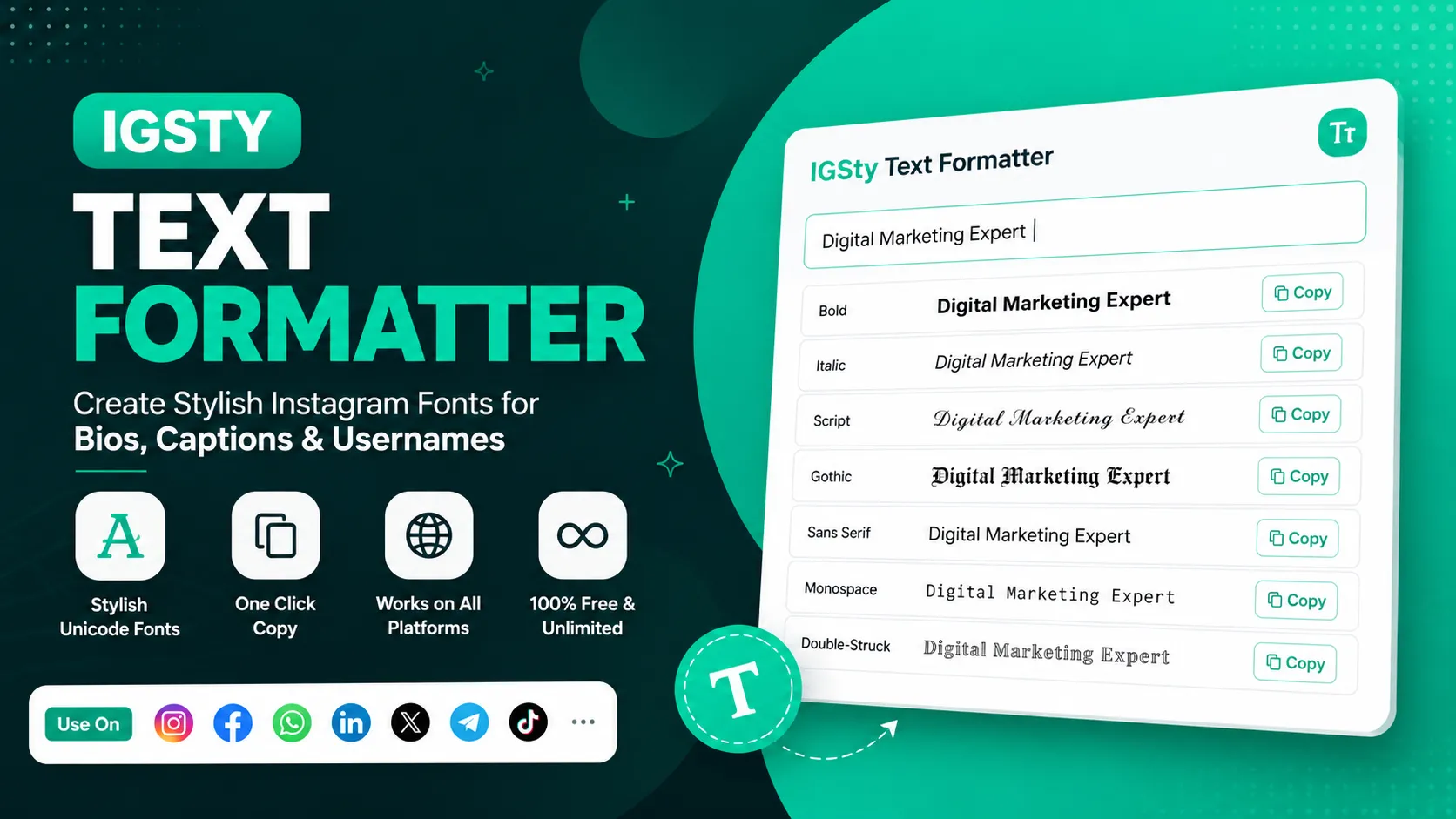
Example:
Digital Marketing ExpertStep 3
The tool automatically generates multiple font styles.
Examples include:
- Bold
- Italic
- Script
- Gothic
- Sans Serif
- Double-Struck
- Monospace
- Circled
- Fullwidth
Step 4
Choose the style you like.
Step 5
Click Copy.
Step 6
Paste it directly into Instagram, Facebook, LinkedIn, WhatsApp, or any supported platform.
No downloads.
No registration.
No payment.

Popular Font Styles Available
| Style | Best For |
|---|---|
| Bold | Headlines and important words |
| Italic | Quotes and emphasis |
| Script | Elegant bios |
| Gothic | Gaming profiles |
| Monospace | Technical content |
| Circled | Lists and numbering |
| Double-Struck | Creative branding |
| Sans Serif | Modern appearance |
Choosing the right style depends on your audience and content.
Where Can You Use Stylish Text?
Although many people associate these tools with Instagram, Unicode formatting works across several platforms.
| Platform | Supported |
|---|---|
| ✅ Yes | |
| ✅ Yes | |
| ✅ Yes | |
| ✅ Yes | |
| Telegram | ✅ Yes |
| Discord | ✅ Yes |
| Threads | ✅ Yes |
| TikTok | ✅ Yes |
| X (Twitter) | ✅ Yes |
Some platforms may display a few decorative characters differently depending on the operating system or browser.
Best Uses for IGsty Text Formatter
Instagram Bio
Make your profile look more professional.
Example:
Digital Creator
Travel Blogger
Coffee Lover
can become
𝗗𝗶𝗴𝗶𝘁𝗮𝗹 𝗖𝗿𝗲𝗮𝘁𝗼𝗿
𝗧𝗿𝗮𝘃𝗲𝗹 𝗕𝗹𝗼𝗴𝗴𝗲𝗿
☕ 𝗖𝗼𝗳𝗳𝗲𝗲 𝗟𝗼𝘃𝗲𝗿
Instagram Captions
Highlight important phrases without writing everything in capital letters.
Usernames
Some Unicode characters allow usernames to look different from ordinary accounts.
Story Highlights
Use decorative text for highlight covers and labels.
Business Profiles
Brands can make announcements, product launches, offers, and promotional messages more eye-catching.
Why Instagram Doesn’t Have Native Bold Text
Instagram itself doesn’t include built-in font formatting for captions or bios.
Instead, users rely on Unicode characters generated by online text formatter tools.
This approach works because Instagram supports Unicode encoding, allowing many special characters to display correctly without additional software.
Is IGsty Text Formatter Free?
Yes.
Most online text formatters are completely free to use.
There is usually:
- No registration
- No subscription
- No installation
- No login
- Unlimited text generation
This makes them popular among creators, marketers, businesses, and students alike.
Is It Safe to Use?
Generally, yes.
Since the tool only converts your text into Unicode characters, it doesn’t modify your Instagram account or require account access.
For the best experience:
- Avoid entering sensitive information.
- Use trusted browser-based tools.
- Check the privacy policy if you’re using a third-party website.
- Preview your formatted text before publishing.
Benefits of Using IGsty Text Formatter
Some of the biggest advantages include:
- Makes profiles more attractive
- Improves visual branding
- Saves time
- Works instantly
- Mobile-friendly
- Browser-based
- Supports copy-and-paste
- Compatible with most social media platforms
- No software installation
- Completely free
Can Businesses Use Unicode Fonts?
Absolutely.
Many businesses use Unicode text for:
- Product launches
- Promotional offers
- Limited-time sales
- Brand announcements
- Instagram bios
- LinkedIn headlines
- Facebook page descriptions
However, moderation is important.
Using decorative text for every sentence can reduce readability. A better approach is to highlight only key words or headings while keeping the rest of the content simple and easy to read.
Common Problems and How to Fix Them
Although Unicode text works on most platforms, you may occasionally notice that some characters don’t appear exactly as expected. This usually happens because different devices, browsers, and operating systems support Unicode differently.
Here are some common issues and their solutions.
| Problem | Possible Cause | Solution |
|---|---|---|
| Font looks normal instead of stylish | Platform doesn’t support that Unicode style | Try another font style |
| Boxes (□) appear instead of letters | Older device or browser | Update your browser or choose a simpler style |
| Characters look different on another phone | Operating system differences | Test on Android and iPhone before publishing |
| Text is difficult to read | Decorative font is too complex | Use Bold or Sans Serif instead |
| Copy button doesn’t work | Browser permission or extension conflict | Refresh the page or copy manually |
Device Compatibility
IGsty Text Formatter works on almost every modern device.
Supported Devices
- Android phones
- iPhone
- Windows PCs
- MacBooks
- Tablets
- Chromebooks
Supported Browsers
- Google Chrome
- Safari
- Microsoft Edge
- Mozilla Firefox
- Opera
If you’re using an outdated browser, some Unicode characters may not display correctly.
Accessibility Tips
Stylish text looks attractive, but accessibility should also be considered.
If your audience includes people using screen readers or accessibility tools:
- Use decorative fonts only for headings or short phrases.
- Keep long captions in normal text.
- Avoid mixing multiple font styles in one sentence.
- Don’t replace every letter with symbols.
- Make important information easy to read.
A clean and readable profile often performs better than one overloaded with decorative characters.
Does Stylish Text Affect SEO?
If you’re using IGsty Text Formatter for social media profiles, there is generally no direct impact on website SEO.
However, for websites:
- Normal text is usually better for search engines.
- Unicode characters should only be used where appropriate.
- Avoid replacing entire articles with decorative fonts.
For Instagram, Facebook, LinkedIn, and similar platforms, stylish text is mainly used for visual appeal rather than search ranking.
IGsty Text Formatter vs Native Instagram Text
| Feature | IGsty Text Formatter | Native Instagram |
|---|---|---|
| Bold Text | ✅ Yes | ❌ No |
| Italic Text | ✅ Yes | ❌ No |
| Fancy Fonts | ✅ Yes | ❌ No |
| Copy & Paste | ✅ Yes | Not Required |
| Browser-Based | ✅ Yes | N/A |
| Free | ✅ Yes | ✅ Yes |
| Registration | ❌ Not Required | Instagram Account Required |
Unicode Text vs Font Apps
Many users wonder whether they should use an online formatter or install a font application.
Unicode Text Formatter
Pros
- Free
- No installation
- Instant results
- Works on multiple platforms
- Easy to copy and paste
Cons
- Some styles may not appear on older devices
- Limited to available Unicode characters
Font Apps
Pros
- More customization
- Keyboard integration
- Additional design features
Cons
- Requires installation
- May include advertisements
- Some apps require subscriptions
For most users, an online formatter is the faster and more convenient option.
Best Practices
To get the best results:
- Keep your bio readable.
- Use bold text only for important words.
- Test fonts before publishing.
- Choose simple styles for professional profiles.
- Avoid using more than two font styles in one post.
- Update your bio regularly.
- Combine stylish text with relevant emojis when appropriate.
Mistakes to Avoid
Many users make these common mistakes:
- Writing entire paragraphs in decorative fonts.
- Using difficult-to-read Gothic styles for business profiles.
- Mixing five or six different font styles together.
- Forgetting to preview text on mobile devices.
- Copying unsupported symbols.
Keeping your formatting simple usually creates a better impression.
Alternatives to IGsty Text Formatter
If you want to explore other text formatting tools, several browser-based options are available.
Popular alternatives include:
- TextGlam
- Postoria
- Nuelink
- CreatorsJet
- PostEverywhere
Most of these tools provide:
- Unicode font generation
- Live preview
- One-click copy
- Mobile support
- Free usage
Choose the one that offers the styles and user experience you prefer.
Looking for an alternative? If you want a fast and free way to create stylish Instagram fonts, you can also try TextGlam’s Instagram Text Formatter, which works instantly without requiring registration.
Who Should Use IGsty Text Formatter?
This tool is useful for many different users.
Content Creators
Create eye-catching captions, bios, and usernames.
Influencers
Make profile information more attractive.
Businesses
Highlight promotions, announcements, and offers.
Students
Customize social profiles for a unique appearance.
Gamers
Create stylish usernames and Discord profiles.
Digital Marketers
Improve social media branding across multiple platforms.
Frequently Asked Questions
1. What is IGsty Text Formatter?
IGsty Text Formatter is a free online tool that converts plain text into stylish Unicode text for Instagram, Facebook, LinkedIn, WhatsApp, and other social media platforms.
2. Is IGsty Text Formatter free?
Yes. Most online text formatters are completely free and don’t require registration or downloads.
3. Does Instagram support fancy fonts?
Instagram doesn’t support custom fonts directly. Instead, it displays Unicode characters generated by text formatter tools.
4. How do I make bold text on Instagram?
Type your text into a Unicode text formatter, copy the bold version, and paste it into your Instagram bio, caption, or comment.
5. Can I use stylish text on LinkedIn?
Yes. Unicode text works on LinkedIn headlines, profile sections, and posts, although using it sparingly is recommended for professional readability.
6. Why do some fonts not display correctly?
Some Unicode characters aren’t supported on every device or browser. Choosing simpler font styles usually solves the problem.
7. Is Unicode safe?
Yes. Unicode is an international character standard used across websites, operating systems, and applications worldwide.
8. Can businesses use IGsty Text Formatter?
Yes. Businesses often use stylish text for branding, product launches, promotional campaigns, and social media announcements.
9. Does using stylish text increase engagement?
Stylish text can make important words stand out and improve visual appeal, which may encourage users to notice your content. However, high-quality content remains the biggest factor in engagement.
10. Which platforms support Unicode text?
Most major platforms support Unicode, including Instagram, Facebook, LinkedIn, WhatsApp, Discord, Telegram, Threads, TikTok, and X (Twitter).
Conclusion
IGsty Text Formatter is a quick and simple way to transform plain text into stylish Unicode characters without installing any software or creating an account. Whether you’re updating an Instagram bio, writing an engaging caption, creating a unique username, or improving your brand’s social media presence, it provides an easy copy-and-paste solution that works across most popular platforms.
The best results come from using decorative text thoughtfully. Choose readable font styles, test them on different devices, and highlight only the most important words instead of formatting everything. This keeps your content attractive, professional, and easy to understand.
Whether you’re a creator, influencer, business owner, marketer, or casual social media user in India or anywhere else, IGsty Text Formatter offers a fast, free, and effective way to make your online presence stand out.